

We have all been there; your lesson went great, having received a wealth of information throughout the hour, however, two weeks have passed now and the exact phrasing, terminology, positions seem a little blurry or unsure.
Truth is, the work you put in around a lesson, begins before/during the actual tuition. When you arrive at your lesson, always bring a recording device with you; whether that’s a pen and paper, video camera, notes app on your phone, or something else. Most coaches will send you notes covering the main points from your lesson (I like to utilise WhatsApp’s features for this) – but it is worth remembering, how you absorbed the information and lesson material will determine how you record it and review it later on. How your coach sees it and writes it down, might not resonate with you personally as well as your own note-taking.
Coaching, is the skill of guiding your student towards the answer, without giving it to them. It is the journey they take themselves that will provide the greatest and most impactful growth. Doing it by themselves will also build resilience, independence and self-belief – knowing that they achieved it on their own (a great coaching session will leave the student feeling like they did it all by themselves).
As the student records the notes, it is a good idea for the coach to oversee them to ensure you are both on the same page and the information was received correctly. In addition; one tip I have when communicating change to a student, is to carefully navigate the language you use to ensure balance is maintained. For example, a player who is trying to stabilise their backswing by not moving their head as much – changes like this, could potentially end up with the student “over-doing it”, and over time, in the absence of a coach, become too static, introducing further problems. To prevent this, coaches can bring balance, by simply showing them how far to go with the change. This can often happen when the student is feeling an exaggeration of the movement they’re trying to enforce – instead, soon after the lesson, begin to work only towards the desired (balanced) position, rather than the exaggerated one. This should prevent your student going from one extreme to the other!
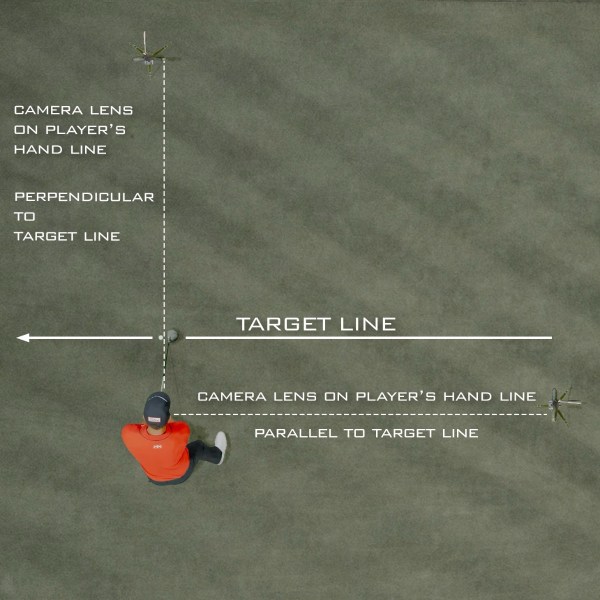
You are now ready to begin analysing your own swing, work on changes and perhaps send videos to your coach. Ideally, you will have a high quality camera/phone and a tripod to hold it. The angle at which you record from is vital – notice in the image below, the camera is not directly behind the ball or the players legs, instead, it is behind the players hands – this is your “down-the-line” recording position. This is important when viewing, that you can see the club pointing directly down the line, swing plane, attack angle, etc. Ideally the hands will be in the centre of the screen.

From the front, it’s equally important to stand directly in front of the person, with their hands in the center of the screen, and the camera parallel to their shoulder line. This position is important to get right for accurate readings of ball position, body rotation, etc. Recording in high quality, with a high frame rate will help you and your coach see the positions in your swing – ideally record in slow-motion, to prevent the blurring of the fast-moving club, allowing for better analysis of the clubface and more. My recommendation is the iPhone for video recording and ease of use. If you want to go fully professional, check out range of cameras with slow motion, from the likes of Canon, Sony and Panasonic.

Now that you have gathered high-quality footage, your coach will be pleased with your camera work, and it will make their job a lot easier! Storage of swings is advised, perhaps in an iCloud or Google Drive folder for ease of access anywhere in the world. Another sharing option is WeTransfer.com, which is an excellent free sharing platform for large files, so you don’t have to sacrifice on video quality! Avoid sending videos on messaging platforms like WhatsApp who will likely compress your video file to send faster, at the cost of the video’s quality.
If you are interested in video coaching with myself, email me directly: gary@garyshawgolf.com, my online video coaching is done via Skillest, the number one video coaching platform, accessible across the world. Get your camera out, and use technology to your advantage!
Talk soon,
Gary

Leave a comment